HOME SECURITY CAMERAS
Meet the Vivint security cameras that protect 2.5 million homes
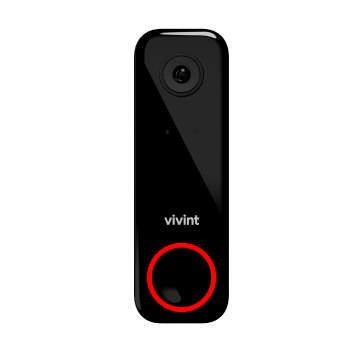
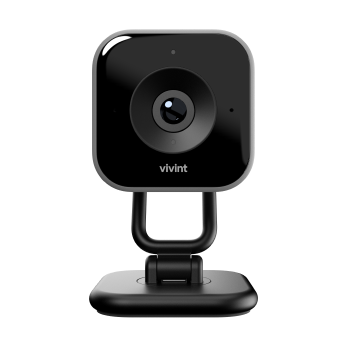


Home Security Camera System
Cameras that protect every part of your home
|
|

|
|
Protect your packages, porch, |
Keep tabs on your kids and pets |
The ultimate perimeter protector. |
|
|
|
|
|
|
| Overall Rating | |||
| WIFI | Yes |
Yes |
Yes |
| Night Vision | Yes |
Yes |
Yes |
| Wired | Yes |
Yes |
Yes |
| Motion Detection | Yes |
Yes |
Yes |
| Video Recording | Yes |
Yes |
Yes |
| Two-Way Audio | Yes |
Yes |
Yes |
| Weather Proof | Yes |
No |
Yes |
| High Field of View | Yes |
Yes |
Yes |
Build your system today — backed by 24/7 monitoring
Drop us a line! Or skip the form
and call us now 844.481.8630
"Best Home Security System for Front Door Security 2026"
"Most Trustworthy Companies in America 2026"
"The Best Pro-Level Smart Home Security System 2026"
"Best Doorbell Cameras in 2026 – AI Security, 24/7 Monitoring, and Smart Home Control"
"Tested and Reviewed: Best professional installed option 2026"
"Best Wireless Security Systems 2026 (WiFi, RF & Cellular) - Expert Tested"
"ENERGY STAR®️ certified"
"The best smart home system I’ve ever tested"
"One of the biggest improvements AI has brought to home security is helping homeowners understand which alerts actually matter."





Popular home security systems
Eliminate DIY stress with professional installation, 24/7 monitoring
and award-winning support.
Security Starter
Basic home security
Doorbell Security
Complete home protection
Safety & Security
Security + Automation
NOT SEEING A PACKAGE YOU LIKE? CALL TO BUILD A CUSTOM SYSTEM.
Everything works together
All packages include
Customer reviews
Real customer reviews tell the true Vivint story.
LAURA R BROYLES
Oct 16, 2026
Representative’s training and…
Representative’s training and willingness to answer questions and make us feel comfortable with our new system.
Corinne Pettiford
Oct 15, 2026
He was very nice and (Patient) with me…
He was very nice and (Patient) with me Thanks so much, David
Lisa Crowe
Oct 15, 2026
t tey made sure he knew what we…
That they made sure he knew what we were doing and knew how to run.
Pamela Tassey
Oct 15, 2026
Too many notifications for front…
Too many notifications for front camera. How do I change settings?
Michael Spruel
Oct 15, 2026
My entire experience was excellent
My entire experience was excellent. Your installer, on the other hand, made that experience great; an intelligent expert answered all my questions and explained the whole process. Very pleasant.
Sherilyn Tyler
Oct 15, 2026
The men were so professional &…
The men were so professional & knowledgeable… Outstanding workers !!!!
Janet Varela
Oct 15, 2026
Great customer service
Great customer service. Very informative and professional.
Jane Billian
Oct 15, 2026
Vivint
Took a while to install but issues that did arise was taken care by the installer. So far unit is working very well and easy to use.
Major Pringle
Oct 15, 2026
The installation was smooth and the…
The installation was smooth and the technician, Jalen Morgan knew what he was doing.
Joy Ingram
Oct 15, 2026
The worker was nice and told us about…
The worker was nice and told us about everything
customer
Oct 15, 2026
Very respectful
Very respectful. Explained in detail everything that we needed to know about the install and the products. Left us his card if we had any questions.
Alexis Pregillana
Oct 15, 2026
it was an easy process to schedule for…
it was an easy process to schedule for intall, and the techs were awesome at explaining everything before leaving. I would recommend Vivint to others!
Scott Johnson
Oct 15, 2026
James was terrific
James was terrific! He did an amazing job and went over the top in customer service! He took his time, explained everything to us, listened and cleaned up. He is the definition of true customer service!
Jeffry Felcman
Oct 15, 2026
Service was excellent
Service was excellent, prompt and thorough. The technician, Ethan, was courtesy and knowledgeable.
Kolby Blatchford
Oct 15, 2026
We had a great experience with Vivint
We had a great experience with Vivint! Patrick and Donnie did an excellent job installing our home security system. Both were professional, knowledgeable, and took the time to make sure everything was installed correctly and working properly. They explained how everything worked and made the whole process easy. We really appreciated their attention to detail and the quality of their work. Highly recommend Patrick and Donnie to anyone getting a Vivint system installed!
ebere totty
Oct 15, 2026
Technician's professionalism and speed.
Technician's professionalism and speed.
At
Oct 15, 2026
Carlos was really nice and great to…
Carlos was really nice and great to talk to made the process easy and was super fast
Brandon
Oct 15, 2026
Jonathan was incredibly knowledgable…
Jonathan was incredibly knowledgable and helpful in getting us the Security System we needed, replacing our dated ADT system. Additionally, our installation tech did a great job and was onsite within minutes to give us the best closed-loop technology on the market!
AMY GLENN
Oct 14, 2026
Everything from sales to installs was…
Everything from sales to installs was perfect.
Rudy Pina
Oct 14, 2026
Great experience what whole crew…
Great experience what whole crew assembling my whole unit solar and panels great customer service and great electrician was very knowledgeable and very helpful. I appreciate the whole crew that installed my whole system..
Lawrence Zygmunt
Oct 14, 2026
Hooked up the system exactly as we…
Hooked up the system exactly as we planned for my home security. Showed me how to use the system and the options that are available.
Asif Shaikh
Oct 14, 2026
To Secure My house and my family.
The Values of your money worth when you get the great service to Secure your home and your family. The results for camera is excellent as well as the range and areas it covers the best. Crystal and very clear.
Nigel Smith
Oct 14, 2026
I had an amazing experience with…
I had an amazing experience with Vivint! Everyone I encountered was extremely patient, professional, and kind throughout the entire process. They took the time to answer my questions and made sure I felt comfortable and confident with my new security system. As a mother who works long overnight hours at the hospital, having peace of mind knowing my children are safe while I’m away means everything to me. I can now go to work feeling more secure and at ease. Thank you, Vivint, for your outstanding customer service and for giving me one less thing to worry about. I truly appreciate you all!
Daniel
Oct 14, 2026
My technician was polite, honest and patient
My technician RB was polite, honest patient and very thorough
DAVID B
Oct 14, 2026
Terrific installation
The installation. Ben and Richard were terrific. They showed on time and stayed late to get two systems up and working. Unfortunately I had no internet service which made their install more difficult but they stayed and got their equipment installed and working,
Diane
Oct 14, 2026
I had a great installer Jose
I had a great installer Jose! He explained everything in detail. He did a wonderful install and left everything neat and clean.
Jose Perez
Oct 14, 2026
The technician was courteous and…
The technician was courteous and thorough during the process.
Tammy Silver
Oct 14, 2026
Installation
They were able to give me an earlier installment date. Intaller was very profession and explained the equipment thoroughly.
PauletteWood
Oct 14, 2026
I am finally relieved to have my new…
I am finally relieved to have my new security system. I am able to see who is coming and going around my house, it gives me a sense of security knowing I have a reputable company that I can trust. They were upfront with the cost and there were no hidden prices. I look forward to a good continuing relationship with Vivint.
Rene
Oct 14, 2026
An amazing experience!
I had an amazing experience as my technician, Tristan Santana s was the best! He was highly knowledgeable, respectful, professional and courteous!
Richard Sage
Oct 14, 2026
Jariel was very knowledgeable
Jariel was very knowledgeable, helpful with the app setup on my phone and conscientious about cleanup as it was a torrential rainfall the day of installation. She truly cared about making sure I was satisfied with her work and that everything was working properly for me.
67,930 reviews on

Security camera FAQs
(Last updated September 2026)
What security cameras does Vivint offer?
Vivint offers three security cameras:
- Outdoor Camera Pro
- Indoor Camera Pro
- Doorbell Camera Pro
Each covers different parts of the home, but they work in harmony to ensure total protection and crime prevention, inside and out.
How much do Vivint cameras cost?
At Vivint you’ll pay the following for our home security cameras:
Outdoor Camera Pro: $6.67/mo. for 60 payments
Doorbell Camera Pro: $4.17/mo. for 60 payments
Indoor Camera Pro: $4.17/mo. for 60 payments
Security camera costs vary by camera type:
Outdoor security camera:
Outdoor cameras cost $100-$200 for wireless models and $200-$400 for wired models.
Outdoor camera costs fluctuate depending on whether the camera is wired or wireless. Wireless cameras are generally less expensive as they are simpler to install and more compact. A single wireless camera can cost $100 to $200 depending on video quality and its IP weather rating.
Wired cameras tend to cost more, ranging from $200 to $400 each. Some companies like Vivint offer hybrid security cameras that combine both wired and Wi-Fi connections. This allows users to enjoy the benefits of both setups at an affordable price.
Indoor security camera:
Indoor security cameras range from $20-$50 for basic models and $150-$300 for higher-end cameras.
The price of indoor home security cameras differs by features, quality, and brand. Basic models with standard functionalities typically fall within $20 to $50.
Premium indoor security cameras, such as the Vivint Indoor Camera Pro, offer advanced capabilities like night vision, two-way audio, and a wide-angle lens. Depending on a camera’s features and specifications, a high-end camera can cost between $150 and $300.
Learn more about the cost of home security devices, and get more information on the cost of Vivint security systems.
What are the best security cameras?
The best, most effective security system is one custom-built for your unique home—one that protects your property, privacy, and peace of mind. Vivint equipment packages, designed to fit your specific needs, range from basic protection to advanced coverage, and the customer has the option to customize.
When building your own security camera package, begin with the basics—the Vivint Starter Kit—then choose additional products to complete your smart home system. The Vivint Starter Kit includes a Vivint Smart Hub, $300 worth of security sensors, the Vivint app, and 24/7 monitoring, starting at $39.99 per month. You can add on security cameras, which can be paid for upfront or financed and added to your monthly rate. The table below lists the Vivint security cameras, their list prices, and their monthly rates when financed over 60 months:
|
Product |
List Price |
60 months |
|
Vivint Doorbell Camera Pro |
$249.99 |
$4.17 |
|
Vivint Indoor Camera |
$199.99 |
$4.17 |
|
Vivint Outdoor Camera Pro |
$399.99 |
$6.67 |
|
Vivint Playback DVR |
$399.99 |
$6.66 |
There are two payment options for your Vivint system. To avoid a long-term contract, customers can buy their equipment upfront and pay month-to-month for monitoring services. Alternatively, equipment can be financed and bundled with 24/7 monitoring fees, requiring a five-year contract and monthly payment.
Read more tips on choosing the best security cameras.
Do Vivint cameras have night vision and two-way talk?
Yes! The Vivint Outdoor Camera Pro, Indoor Camera Pro, and Doorbell Camera Pro have night vision and two-way talk, letting you check in from anywhere and see detailed footage, day or night.
Night vision on Vivint cameras uses Infrared (IR) technology to give you a clear picture at night. IR LEDs emit invisible light that reflects off objects and people. The cameras’ sensors detect this infrared light and convert it into a clear black-and-white image, allowing you to see clearly in dark conditions.
Two-way talk is available on all Vivint cameras via the Vivint app or the Vivint Smart Hub. You can talk to porch guests through the Doorbell Camera Pro, chat with your kids through the Indoor Camera Pro, and tell a lurker to get off your property with the Outdoor Camera Pro.
How long is video saved with Vivint cameras?
With Vivint Playback you can save up to 10 days of 24/7 video footage from your Indoor Camera Pro, Outdoor Camera Pro, and Doorbell Camera Pro.
Footage from up to 12 cameras is stored directly on the cameras, ensuring a smoother, faster viewing experience on the Vivint app with minimal buffering. And because Vivint cameras feature enhanced night vision and audio, you’ll always get a clear picture of what’s happening in and around your home, day and night.
Learn more about Vivint security camera video storage.
How do I install home security cameras?
Many of today's IP-based home security cameras can be installed, placed, and configured by homeowners without the need to hire a contractor. With Vivint home security cameras, the convenience of professional installation by Smart Home Pros is part of your smart home purchase. But once you have security cameras installed, you may want to make small adjustments sometime in the future, such as relocating cameras or adjusting angles. If you decide to do the work yourself, we suggest paying special attention to these four points:
- Camera height — Mount cameras well out of reach to prevent tampering.
- Signal strength — Make sure camera placement is within your Wi-Fi range.
- Power supply routing — The closer to the power source, the better.
- Mounting — You want a secure and weatherproof attachment.
Read more about the benefits of professional installation.
Are Vivint cameras wired or wireless?
Vivint cameras—like the Outdoor Camera Pro 3—are hardwired for continuous power, so you don’t have to worry about changing batteries or the camera going offline if the Wi-Fi is out. However, Vivint cameras connect wirelessly to your system for alerts, live viewing, and more. The Indoor Camera Pro is plug-in and wireless, so you can move it around easily. Professional installation ensures every camera is set up for the best performance.
How many cameras can my Vivint system support?
Your Vivint system supports up to 12 cameras: More than enough cameras to thoroughly protect your property, inside and out.
Learn more about how many security cameras you need to protect your property.
The system supports multiple cameras subject to sufficient Wi-Fi speeds. Without a Vivint services plan, product and system functionality is limited (including loss of remote connectivity).
Where should I place security cameras?
To maximize coverage, place security cameras:
- Above doors
- Over the driveway
- Toward obscure windows
Install indoor cameras in high-traffic zones or near any off-limits areas you want to monitor, like gun safes or medicine cabinets.
Install outdoor cameras approximately 9 feet high to prevent tampering while maintaining a clear picture of what’s happening on the ground.
If you’re wondering where to place your Vivint security cameras, just speak with one of our Smart Home Pros. They’ll examine your property and needs, to provide the best recommendation.
Learn more about where to place outdoor security cameras.
What is Vivint Smart Deter™
Vivint Smart Deter™ is an industry-first security feature built into Vivint’s Outdoor Camera Pro and Doorbell Camera Pro that actively helps prevent crime instead of just recording it. Powered by AI, it detects lurkers, porch pirates, and more, then responds with lights and sounds to warn intruders they’ve been spotted. As soon as a threat is detected and deterred, Vivint sends you notifications and smart clips—so you can see what happened, when it happens.
What are the available add-ons for Vivint HomeProtect?
Vivint HomeProtect customers can add on the following products:
- Doorbell Camera Pro
- Chime Extender (if adding on the Doorbell Camera Pro)
- Playback
- Smart Thermostat
- Smart Lock
- Vivint Protection Plan
- Additional Motion Sensors
- Additional Door & Window Sensors.
Upgrading to HomeProtect Pro allows you to add-on even more products, like the Outdoor Camera Pro, Smart Lighting, and more.
Security camera articles

Security Cameras
Vivint Security Cameras that Whistle
Did you know Vivint Smart Home security cameras whistle and actually proactively prevent crime? Find out how their unique features help keep your home safe.

Security Cameras
Vivint Doorbell Camera Pro Reviews (2026)
The Vivint Doorbell Camera Pro is the best doorbell on the market–and we have the reviews to prove it. Read on to find out what people are saying.

Security Cameras
Vivint Security Camera Reviews (2026)
Surveillance cameras are an important part of any home security system. Find out what customers think of Vivint security cameras.

Security Cameras
What is Security Camera Preroll, and Why Does It Matter?
Preroll is an important security camera feature—but you may not have even heard of it. Read on to find out what it is and why it matters.

Security Cameras
Should I Get Security Cameras or an Alarm System?
Compare security cameras vs alarm systems and learn how a unified home security system can provide smarter peace of mind.


